
Introduction
The internet has become a major part of everyday life, but it also comes with risks. Fake websites are one of the most common online threats that users face today. These websites are designed to trick people into sharing personal information, downloading malware, or making fake payments. That is why learning how to detect fake websites before visiting them is extremely important.
For readers of Secure Guide Tech, this guide explains simple ways to identify suspicious websites and stay safe online. By understanding the warning signs, you can protect your personal information and avoid online scams.
What Are Fake Websites?
Fake websites are fraudulent websites created to look like legitimate ones. They often copy the design, branding, and content of trusted companies to fool users.
The purpose of these websites is usually to steal login credentials, banking details, or personal information. Some fake websites also spread malware that can infect your device.
These sites may appear professional at first glance, which is why users need to stay alert.
Why Fake Websites Are Dangerous
Fake websites can cause serious problems for internet users. They can lead to financial loss, identity theft, and data breaches.
If you enter sensitive information on a fake website, hackers may gain access to your accounts or misuse your data.
Some fake websites can also install harmful software on your device without your knowledge.
Being aware of these dangers helps you browse more safely.
Check the Website URL Carefully
One of the easiest ways to detect fake websites is by examining the URL closely.
Fake websites often use addresses that look similar to real websites but contain small spelling mistakes or extra words. For example, attackers may replace letters with numbers or use unusual extensions.
Always read the URL carefully before clicking or visiting a site.
Look for HTTPS Security
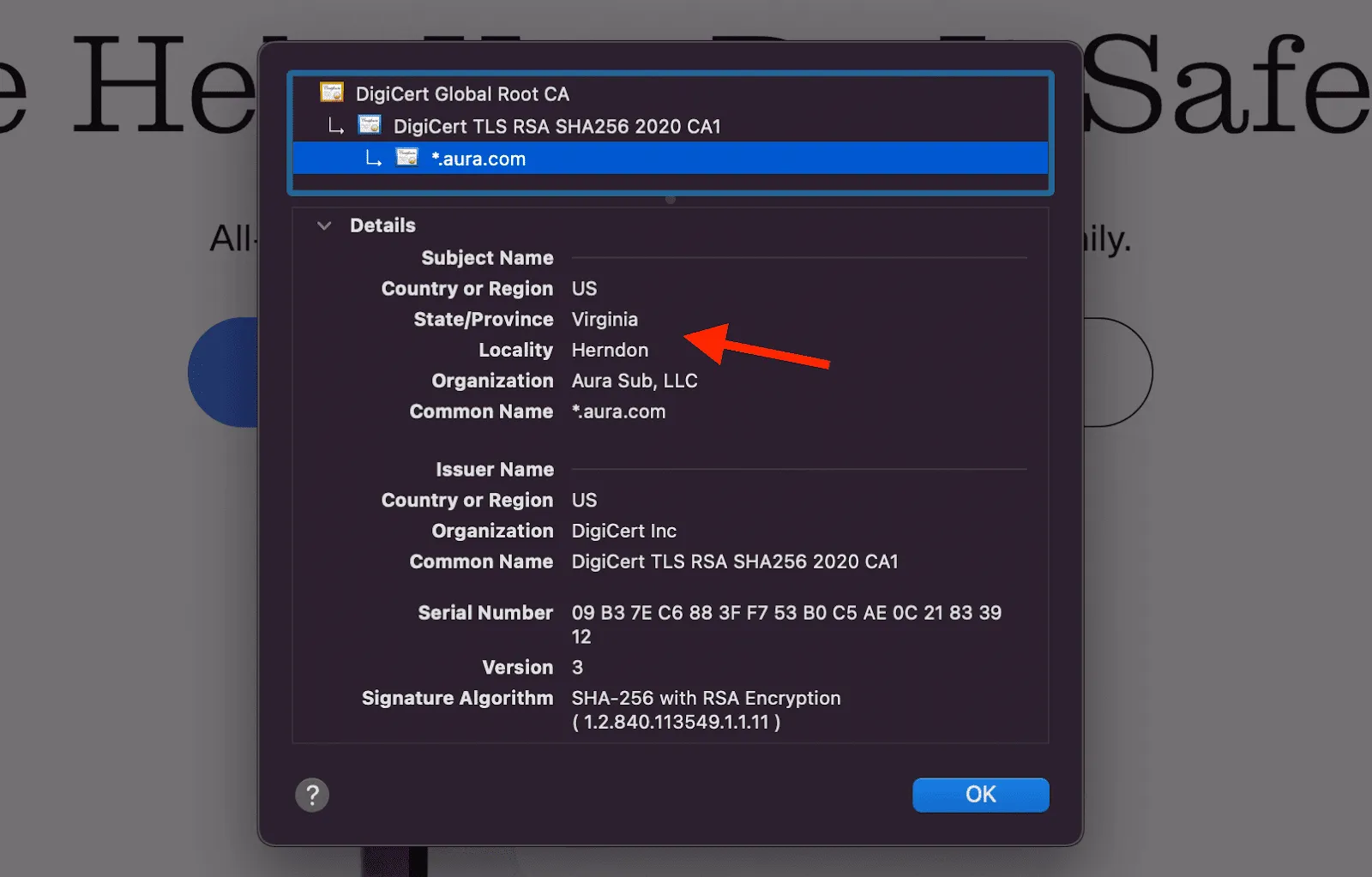
Legitimate websites usually use HTTPS, which provides a secure connection between your browser and the website.
You can identify this by looking for the padlock icon in the browser’s address bar.
Although HTTPS alone does not guarantee a website is genuine, websites without HTTPS are generally unsafe and should be avoided.
Avoid Suspicious Links
Many fake websites are accessed through suspicious links in emails, social media messages, or pop-up ads.
Avoid clicking on unknown or shortened links unless you trust the source.
If you receive an unexpected message asking you to visit a website, verify its authenticity first.
Check Website Design and Content
Fake websites often have poor design quality, broken pages, or spelling mistakes.
Legitimate businesses usually maintain professional-looking websites with high-quality content and working links.
If a website feels rushed, poorly written, or incomplete, it may be fake.
Verify Contact Information
A genuine website usually provides clear contact information, including email addresses, phone numbers, and physical addresses.
Fake websites often have missing or fake contact details.
If you cannot verify the business or contact the company easily, it is a warning sign.
Search for Online Reviews
Before trusting a website, search for reviews and user feedback online.
Many scam websites have negative reviews or warnings posted by previous victims.
Checking reviews can help you identify risky websites before visiting them.
Be Careful with Unrealistic Offers
Fake websites often use deals and discounts that seem too good to be true.
Huge discounts, free products, or urgent offers are common tricks used to pressure users into quick decisions.
If an offer feels unrealistic, take extra time to verify the website.
Check Domain Age
Many fake websites are newly created and disappear quickly after scamming users.
You can use online tools to check how long a website domain has existed.
Older and established domains are generally more trustworthy than newly created ones.
Avoid Websites with Excessive Ads
Some fake websites are filled with pop-ups and excessive advertisements.
These ads may redirect users to harmful pages or trigger malware downloads.
A website overloaded with suspicious ads should be treated carefully.
Use Security Tools and Browser Protection
Modern browsers and antivirus programs include features that warn users about unsafe websites.
Keep your browser and antivirus software updated to benefit from the latest protection.
Security tools can help detect malicious websites before you visit them.
Common Signs of Fake Websites
Some common warning signs include:
- Misspelled URLs
- Poor website design
- Missing contact information
- Too many pop-ups
- Unrealistic offers
- Requests for unnecessary personal information
- Lack of HTTPS security
Recognizing these signs can help you avoid scams.
Common Mistakes to Avoid
Many users ignore small warning signs because a website looks professional.
Another common mistake is clicking links from unknown emails or messages without checking them first.
Sharing personal information too quickly is also risky.
Taking a few extra seconds to verify a website can prevent major problems.
Tips for Safe Browsing
Always type website addresses directly into your browser when possible.
Use strong passwords and enable two-factor authentication for important accounts.
Avoid downloading files from unknown websites.
Regularly update your devices and security software.
Stay informed about common online scams and cyber threats.
These habits improve your overall online safety.
Conclusion
Learning how to detect fake websites before visiting them is an essential part of staying safe online. Cybercriminals continue to create convincing fake websites, making awareness more important than ever.
For readers of Secure Guide Tech, following these tips can help protect your personal information, devices, and finances from online scams.
By staying cautious, checking website details carefully, and using trusted security tools, you can browse the internet with greater confidence and security.