
In today’s digital world, computers are an essential part of daily life. From work and education to entertainment and online shopping, people use PCs for almost everything. However, as internet usage increases, so do cyber threats. Viruses and malware can damage your system, steal personal information, and slow down your computer. That is why learning how to protect your PC from viruses and malware is extremely important.
For readers of Secure Guide Tech, this guide explains practical and beginner-friendly ways to keep your computer safe. You do not need advanced technical knowledge to secure your device. By following a few simple steps, you can reduce risks and enjoy a safer online experience.
What Are Viruses and Malware?
Viruses and malware are harmful programs designed to damage computers or steal information. Malware is a general term that includes viruses, spyware, ransomware, worms, and trojans.
A virus attaches itself to files or programs and spreads from one device to another. Malware can enter your system through unsafe downloads, suspicious websites, infected USB drives, or phishing emails.
Once inside your PC, these threats can slow down performance, corrupt files, monitor your activities, or even lock your data.
Why PC Protection Is Important
Protecting your computer is important because your PC stores valuable information such as passwords, personal photos, financial records, and work files.
If malware infects your system, hackers may steal your sensitive data or use your device for harmful activities. In some cases, malware can permanently damage files and make your PC unusable.
A secure computer also performs better and provides a smoother user experience.
Install Reliable Antivirus Software
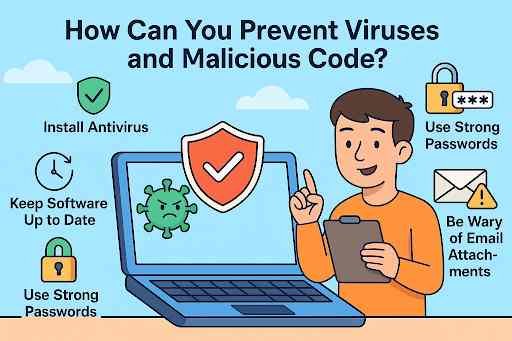
One of the most effective ways to protect your PC is by using antivirus software. Antivirus programs detect, block, and remove harmful files before they can damage your system.
Choose trusted antivirus software and keep it updated regularly. Updates help the software recognize the latest threats.
Running regular scans helps identify hidden malware and keeps your system secure.
Keep Your Operating System Updated
Software updates are essential for security. Operating systems like Windows regularly release updates to fix security vulnerabilities.
Ignoring updates leaves your PC exposed to cyber attacks. Always enable automatic updates so your system stays protected.
Updated software improves both security and performance.
Avoid Downloading from Unknown Sources
Downloading files from untrusted websites is one of the biggest causes of malware infections.
Only download software, games, or documents from official and trusted sources. Avoid pirated software, as it often contains hidden malware.
Before downloading anything, verify that the website is legitimate and secure.
Be Careful with Emails and Links
Phishing emails are commonly used to spread viruses and malware. These emails may look genuine but often contain harmful links or attachments.
Do not click on suspicious links or open attachments from unknown senders.
Always verify the source before interacting with any email content.
Use Strong Passwords
Weak passwords make it easier for hackers to access your accounts and devices.
Create strong passwords using a combination of letters, numbers, and symbols. Avoid using common words or personal details.
Using different passwords for different accounts adds an extra layer of security.
Enable Firewall Protection
A firewall acts as a security barrier between your PC and the internet. It monitors incoming and outgoing traffic and blocks suspicious activity.
Most operating systems come with built-in firewalls. Make sure your firewall is enabled at all times.
This feature helps prevent unauthorized access to your system.
Avoid Clicking on Pop-Ups
Many malicious websites use fake pop-ups to trick users into downloading harmful software.
If you see unexpected pop-ups claiming your PC is infected or offering fake updates, do not click on them.
Close the browser window instead of interacting with suspicious ads.
Backup Your Important Data
Backing up your files is essential in case your PC gets infected or damaged.
Use external drives or cloud storage to keep copies of important documents, photos, and files.
Regular backups ensure that you do not lose valuable data if malware attacks your system.
Use Secure Internet Connections
Public WiFi networks can expose your data to hackers. Avoid accessing sensitive information on public networks.
If you must use public WiFi, consider using a VPN for extra security.
At home, secure your WiFi network with a strong password and updated router settings.
Scan External Devices
USB drives and external hard drives can carry viruses from infected systems.
Always scan external devices before opening files on your PC.
This simple step can prevent malware from spreading to your computer.
Common Signs of Malware Infection
Recognizing the signs of malware can help you act quickly before serious damage occurs.
Some common signs include:
- Slow computer performance
- Frequent crashes or errors
- Unwanted pop-ups
- Unknown programs running automatically
- Browser redirects
- Missing or corrupted files
If you notice these issues, run a full antivirus scan immediately.
Common Mistakes to Avoid
Many users accidentally increase their risk of infection by ignoring security practices.
Using outdated software, downloading unknown files, and disabling antivirus protection are common mistakes.
Another mistake is clicking on every link or advertisement without checking its authenticity.
Avoiding these habits greatly improves your PC security.
Tips for Long-Term PC Security
Maintaining long-term security requires consistent habits.
Keep your antivirus and operating system updated.
Regularly scan your PC for threats.
Use strong passwords and enable two-factor authentication when possible.
Stay informed about new cyber threats and security practices.
Simple daily habits can make a huge difference in protecting your device.
Conclusion
Learning how to protect your PC from viruses and malware is essential for staying safe in today’s digital world. Cyber threats are constantly evolving, but simple security measures can significantly reduce the risk of infection.
For readers of Secure Guide Tech, following these tips will help keep your computer secure, your data protected, and your online experience safe.
By staying alert, using trusted security tools, and practicing safe browsing habits, you can enjoy better performance and stronger protection for your PC.