
Introduction
Learning how to detect phishing emails and messages is one of the most important internet safety skills today. Cybercriminals constantly create fake emails, text messages, and online notifications designed to trick people into sharing passwords, banking information, or personal details.
Many phishing scams look very real. Some messages pretend to come from banks, delivery companies, social media platforms, or trusted websites. Because these scams often appear professional, many users click harmful links without realizing the danger.
Phishing attacks are becoming more common every year, and anyone can become a target. The good news is that most phishing emails and messages contain warning signs that can help you identify them before any damage happens.
At Secure Guide Tech, we believe internet safety should be simple and easy for everyone to understand.
What is a Phishing Scam
A phishing scam is a type of cyberattack where scammers pretend to be trusted organizations or people to steal sensitive information.
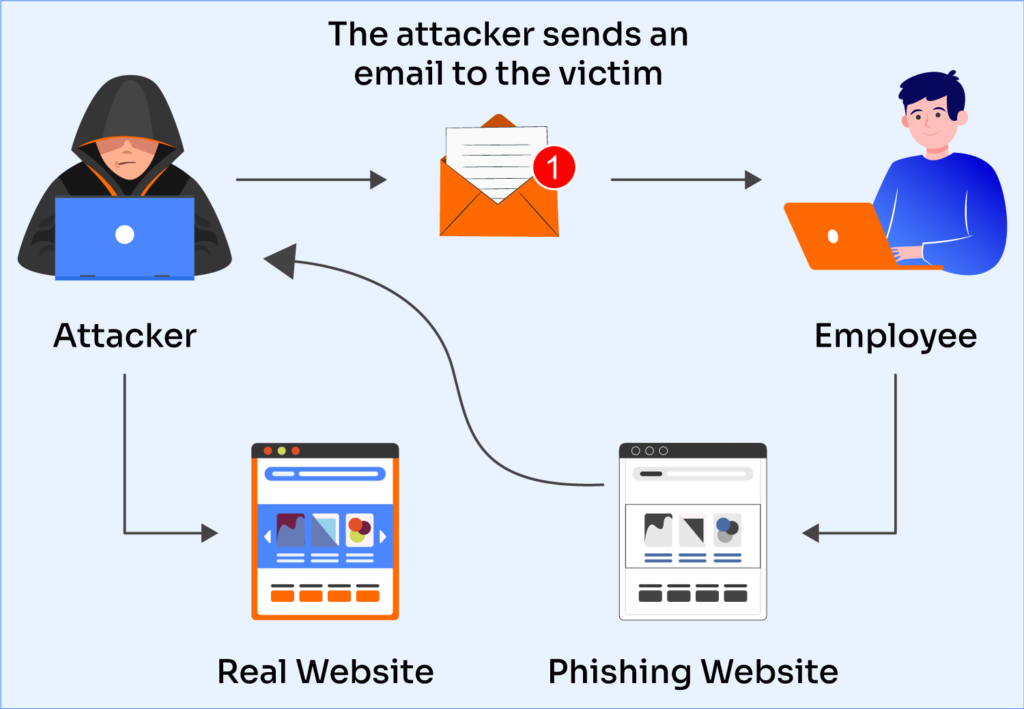
These scams usually arrive through emails, SMS messages, social media chats, or fake websites. The main goal is to trick users into clicking dangerous links, downloading harmful files, or entering personal information.
Phishing scams often create urgency or fear to make users react quickly without thinking carefully.
Understanding how phishing works is the first step toward staying safe online.
Why Phishing Attacks are Dangerous
Phishing scams can lead to serious problems if users share personal information with scammers.
Cybercriminals may steal:
- Email passwords
- Bank account details
- Credit card information
- Social media accounts
- Personal identity information
Once scammers gain access to your accounts, they may misuse your information, steal money, or spread scams to other people.
This is why learning how to detect phishing emails and messages is extremely important for online safety.
Check the Sender’s Email Address Carefully
One of the easiest ways to identify phishing emails is by checking the sender’s email address carefully.
Scammers often create fake addresses that look similar to real companies. For example, they may replace letters with numbers or add extra characters to make the email appear official.
A message may look like it comes from a trusted company, but the actual email address often reveals the scam.
Always examine the sender information before clicking anything.
Look for Spelling and Grammar Mistakes
Many phishing emails contain spelling errors, strange sentences, or poor grammar.
Professional companies usually review their emails carefully before sending them to customers. Scam messages often feel rushed or poorly written.
If an email contains unusual wording, random capitalization, or awkward sentences, it could be a phishing attempt.
While some scammers create professional-looking messages, grammar mistakes are still a common warning sign.
Be Careful with Urgent Messages
Phishing scams often create panic or urgency to pressure users into acting quickly.
You may see messages claiming:
- Your account will be suspended
- Your bank account is locked
- A payment failed
- You won a prize
- Immediate action is required
Scammers want users to react emotionally instead of thinking carefully.
Real companies usually provide proper explanations and do not force users into immediate actions through suspicious links.
Avoid Clicking Suspicious Links
One of the most dangerous parts of phishing emails and messages is the fake link.
Scammers create websites that look similar to real websites in order to steal login information. Clicking these links may lead to fake login pages or harmful downloads.
Before clicking a link, hover your mouse over it to check the real website address. If the link looks strange, misspelled, or unrelated to the company, avoid clicking it.
When possible, visit websites directly through your browser instead of using links from emails.
Watch Out for Unexpected Attachments
Phishing emails sometimes include harmful attachments disguised as invoices, reports, or documents.
Opening these files may install malware or viruses on your device. If you receive unexpected attachments from unknown senders, do not download or open them.
Even if the email appears to come from someone you know, stay careful if the message feels unusual or suspicious.
Cybercriminals sometimes hack accounts to spread phishing attacks.
Fake Login Pages are Common
Many phishing scams direct users to fake login pages that look almost identical to real websites.
Scammers use these fake pages to steal usernames and passwords. Once users enter their information, cybercriminals gain access to their accounts.
Always check the website address carefully before logging in. Secure websites usually begin with “https” and use the correct official domain name.
Small differences in spelling may indicate a fake website.
Be Careful with SMS Phishing
Phishing scams are not limited to emails. SMS phishing, also known as “smishing,” has become very common.
Scammers send fake text messages pretending to be banks, delivery companies, or online services. These messages often include suspicious links or urgent warnings.
Never trust unexpected text messages asking for personal information or login details.
If you are unsure, contact the company directly through its official website or customer support.
Social Media Phishing Scams
Cybercriminals also use social media platforms to spread phishing scams.
Fake accounts may send messages claiming you won prizes, received account warnings, or need to verify information.
Some scams also spread through fake advertisements or suspicious posts containing dangerous links.
Avoid clicking unknown links shared through direct messages or suspicious accounts.
Never Share Sensitive Information Through Email
Legitimate companies rarely ask for passwords, banking details, or sensitive information through email or messages.
If you receive a message requesting private information, treat it as suspicious until verified.
Sharing personal information with scammers may lead to account theft or financial fraud.
Always verify requests directly with the company before responding.
Use Two-Factor Authentication
Two-factor authentication adds an extra layer of security to your accounts.
Even if scammers steal your password, two-factor authentication makes it harder for them to access your accounts without the second verification step.
Most major websites and apps now support this feature.
Enabling two-factor authentication is one of the simplest ways to improve online security.
Keep Your Devices Updated
Software updates often include important security improvements.
Using outdated apps or operating systems may increase your risk of phishing-related malware attacks.
Regularly updating your device, browser, and antivirus software helps improve protection against online threats.
Simple security habits can reduce cyber risks significantly.
Trust Your Instincts Online
If something feels suspicious, it is better to stay cautious.
Many phishing scams rely on users ignoring warning signs because they are distracted or in a hurry. Taking a few extra seconds to verify a message can prevent major security problems.
Safe browsing habits are one of the best defenses against phishing attacks.
Teach Family Members About Phishing
Children, older adults, and beginners are often common targets for phishing scams because they may not recognize warning signs easily.
Teaching family members basic internet safety habits can help protect everyone from online threats.
Simple conversations about suspicious links, fake messages, and online scams can improve digital safety at home.
Internet safety awareness is important for all age groups.
What to Do if You Clicked a Phishing Link
If you accidentally click a phishing link, act quickly.
Change your passwords immediately, especially if you entered login information. Run a security scan on your device and monitor important accounts for suspicious activity.
If banking information was involved, contact your bank as soon as possible.
Quick action can help reduce damage after a phishing attempt.
Final Thoughts
Understanding how to detect phishing emails and messages is an important part of staying safe online. Phishing scams continue to evolve, but most attacks still contain warning signs like suspicious links, fake urgency, grammar mistakes, and unusual requests for personal information.
Simple habits like checking email addresses, avoiding suspicious links, using two-factor authentication, and staying cautious online can help protect your accounts and personal data.
At Secure Guide Tech, we believe internet safety should be simple and practical for everyone. Staying informed and paying attention to online warning signs can greatly reduce your risk of becoming a phishing victim.